Be honest. How many times have you written the exact same PostgreSQL backup script? Once for staging. Once for production. Once for that side project you spun up last weekend. Every time, you copy the previous one, change the database name, and quietly hope you didn't forget a flag.
None of that work is interesting. You're not solving a hard problem. You're just plumbing the same six values into the same one-line command, then babysitting a cron entry nobody looks at until the day everything is on fire.
That's the tax most teams pay for "simple" scheduled jobs. Krons24 templates exist so you stop paying it.
Why templates exist
Most scheduled jobs aren't unique snowflakes. Backing up a Postgres database. Rotating log files. Syncing a folder to S3. Pinging a health endpoint. These are five-line scripts that thousands of teams have already written, debugged, and quietly hated.
Templates encode the boring 95% of a job. The correct flags. The sensible schedule. The retry policy you'd want if you bothered to add one. What's left is the 5% that's actually yours: your hostname, your password, your database name. Type those in and you're done.
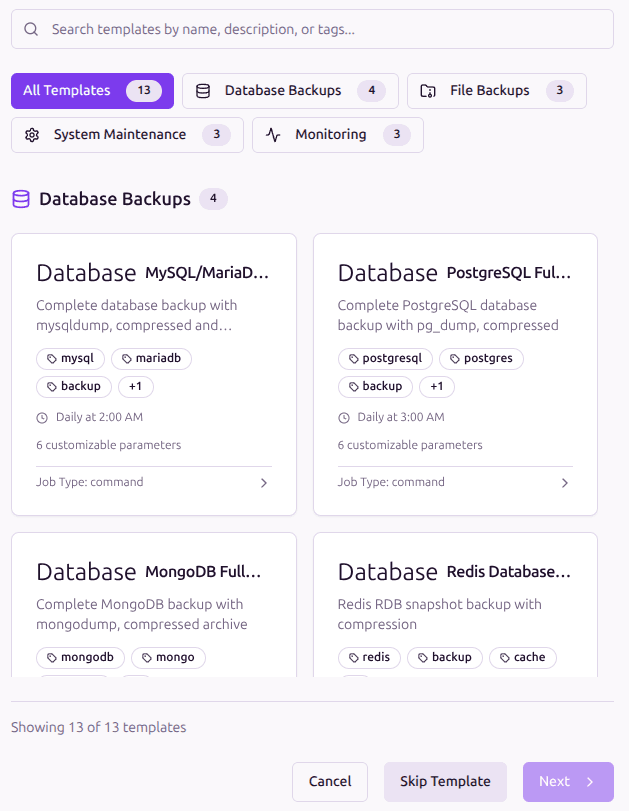
What's inside the PostgreSQL template
When you pick PostgreSQL Full Backup from the gallery, the template has already made the decisions you'd otherwise spend an afternoon second-guessing:
- •The right pg_dump flags for a binary, compressed dump in a single file
- •A timestamped filename pattern so back-to-back runs never overwrite each other
- •A daily 3 AM schedule, comfortably off-peak for most workloads
- •Automatic retries on failure, so a flaky network at 3 AM doesn't ruin your morning
- •Encrypted password handling, so credentials never sit in plain text on disk
Here's what the resolved command looks like once the template fills in your values. Nothing exotic. Just pg_dump, the way you'd write it yourself if you got it right the first time:
pg_dump -Fc \
  -h $DB_HOST -p $DB_PORT \
  -U $DB_USER $DB_NAME \
  > $BACKUP_PATH/${DB_NAME}_$(date +%Y%m%d_%H%M%S).dump
Six placeholders, one clean command, and no bespoke tooling you'll have to maintain later.
How you use it (60 seconds, six fields)
From the dashboard, hit New Job, then Use Template, then PostgreSQL Full Backup. Six fields appear. Five of them already have sensible defaults filled in. The only one that's truly empty is the password.
DB Host
localhost
DB Port
5432
DB User
postgres
DB Password
(your input)
DB Name
myapp_db
Backup Path
/var/backups/postgres
If your database lives on the same host as the worker and you're using the standard postgres user, the realistic input is two fields. Two. Your password and your database name. Click Save. From the next 3 AM, your backups are running on their own.
About that password field
This is the part most homegrown backup scripts get wrong, and it usually only surfaces during a security audit. The template handles it for you. You type the password once, and from then on it's encrypted in storage and never written to a file on disk. One less thing to worry about at review time.
What you get for free
Once you save the job, it stops being a "template thing" and just becomes a regular Krons24 job. Which means you inherit everything the platform offers without writing a single extra line:
- •Every nightly run shows up in your execution history with status, duration, and exit code
- •Full logs are captured per run and stay searchable from the dashboard
- •If a job fails, you hear about it within minutes via email or webhook, not the next morning
- •Failed jobs retry themselves before giving up
- •You can pause, edit, or trigger the job on demand from the same UI
When to reach for a template (and when not to)
Templates are the right call whenever your job is a standard operation against a standard tool. pg_dump. mysqldump. mongodump. rsync. logrotate. A curl health check. Things thousands of teams have already figured out. The template gives you the answer for free.
Templates are not the right call when the job is genuinely yours. A multi-step pipeline. An in-house CLI. A workflow that touches systems Krons24 doesn't know about. For those, write the script yourself and schedule it as a normal command job. The gallery is here to remove busywork, not to box you in.
Try it on a real database
If you've been putting off setting up Postgres backups because it felt like a yak-shave, this is your shortcut. Spin up Krons24, point it at your database, and have a verified scheduled backup running before your coffee gets cold.
Ready to schedule smarter?
Try Krons24 for your own scheduled jobs. Set up in minutes, trusted in production.